

















































Construction progress tracking software compares completed work with an approved project plan. It connects activity quantities, dates, site reports and evidence so builders can identify shortfalls, investigate delays and assign corrective action. Aasaan helps construction teams connect site updates with project monitoring, making progress easier to review across active sites.
By Takshil Sharma, Marketing Manager at Aasaan Tech · 29 October 2026
Your site says the work is progressing. Your handover date says otherwise.
The daily report shows more work completed. Photos keep arriving. Yet the next trade cannot start because one inspection, drawing or work front is still unresolved. By the time that exception reaches the owner, the recovery window may already be smaller.
Construction progress tracking software should help you answer three questions before the review meeting: What should be complete today? What is actually complete? What needs a decision now? This guide shows the measurement method, the buying criteria and the workflow to ask Aasaan to demonstrate.
START WITH YOUR QUESTION
Which construction progress tracking software should you choose?

Choose a system that can connect your approved work plan to dated, location-specific evidence of completed work. During a demonstration, follow one activity from its planned quantity through a site update, review, variance report and assigned corrective action. A dashboard alone is insufficient if you cannot explain where its numbers came from.
The right starting point depends on the decision you are struggling to make:
| Your main problem | Capability to prioritise | What to ask the vendor to demonstrate |
|---|---|---|
| Site updates arrive late | Simple daily reporting and missing-update visibility | An incomplete report and the follow-up process |
| Completion percentages cannot be verified | Quantity or milestone rules with supporting evidence | One reported quantity traced to its location and measurement |
| Activities keep missing their dates | Planned versus actual comparison and remaining-work review | A delayed activity and its effect on the next work package |
| Management cannot prioritise sites | Consistent project summaries with reporting dates | Two sites with different risks, rather than just two percentages |
| Photos are difficult to find | Location-linked visual records | The same area viewed on two different dates |
| Progress and commercial records disagree | Connections between site records and billing workflows | How measurements support review without automatically approving payment |
Aasaan is worth evaluating when your requirement includes site reporting alongside planning, materials, labour and other construction operations. Its public project management solution describes baseline-based monitoring and site updates through channels including WhatsApp. Test the exact workflow, permissions and configuration your team needs in a live demonstration.
For a broader comparison covering the full range of site operations, use our construction site management software buyer’s guide. This article focuses specifically on measuring progress and acting on deviations.
What is construction progress tracking software?

Construction progress tracking software records how much work has been completed, where it was completed and how that compares with the approved plan at a stated reporting date. It helps teams organise site updates, supporting photographs, quantities, milestones and unresolved constraints around the activities they are managing.
A useful record has a clear scope. “Tower A finishing” is too broad for a meaningful daily update. “Tower A, level 4, corridor wall plaster” gives the team a location and a measurable activity. Its record can contain the total approved area, quantity planned by the reporting date, quantity completed, review status and remaining work.
Construction scheduling and progress tracking work together. Scheduling establishes intended dates and relationships between activities. Progress tracking supplies current facts about execution. Project monitoring brings those facts into a management review. The tools may be integrated, but a progress percentage should not be mistaken for a complete scheduling model.
- PlanWhat should be done?
- MeasureWhat was completed?
- VerifyWhat supports the record?
- CompareWhere is the shortfall?
- ActWho resolves it next?
When should a construction business replace manual progress reporting?

Manual tracking can work when a project has a limited number of activities, a disciplined owner and a manageable review process. The reason to invest in software is a recurring control problem, rather than the age of your spreadsheet.
Consider a structured system when several of these situations occur repeatedly:
- The office needs phone calls to confirm which activities are actually complete.
- Engineers submit different report formats, making comparison difficult.
- The same quantity is entered separately for site reporting, management review and commercial records.
- Progress reports arrive after dependent work has already been disrupted.
- No one can distinguish a missing update from zero production.
- A change in scope alters historical percentages without an explanation.
- Photographs are available, but cannot be matched reliably to an activity or location.
- Management meetings spend more time agreeing the numbers than deciding the response.
Before buying, measure a small baseline of your own: reporting turnaround, time spent consolidating reports, unresolved exceptions and corrections needed after review. Those figures give you a sensible way to judge a pilot. They are more useful than adopting another company’s claimed savings as your business case.
What does planned versus actual progress mean?

Planned progress is the work that the approved schedule expected to be complete by a chosen status date. Actual progress is the work recorded as complete under your agreed measurement rules by that same date. Both figures must refer to the same scope, unit and cut-off.
For a measurable activity:
Planned progress (%) = planned cumulative quantity by the status date ÷ total approved quantity × 100
Actual progress (%) = verified cumulative completed quantity by the status date ÷ total approved quantity × 100
Progress variance (percentage points) = actual progress (%) − planned progress (%)
These are physical progress calculations. They do not automatically calculate days of delay, project profitability or formal earned value schedule performance.
Suppose an activity has a total approved scope of 1,500 m². By Friday, the plan required 900 m² and the verified completed quantity is 675 m². Planned progress is 60%, actual progress is 45%, and the variance is −15 percentage points. The quantity shortfall is 225 m². Actual output is 75% of the planned-to-date quantity, but that ratio is a different measure from 45% of total scope completed.
Keep those labels explicit. Calling every result “completion percentage” creates ambiguity precisely when management needs clarity.
Worked example: from a progress shortfall to a recovery decision

The following is an illustrative work package, not an Aasaan customer result. Assume one plastering activity, a constant measurement basis and a reporting cut-off at the end of Friday.
| Record | Illustrative value |
|---|---|
| Location | Tower A, levels 3 and 4 |
| Approved plaster scope | 1,500 m² |
| Planned quantity by Friday | 900 m² |
| Verified completed quantity | 675 m² |
| Installed quantity awaiting review | 60 m², shown separately |
| Recent verified production rate | 75 m² per working day |
| Working days remaining to the activity target | 10 |
| Recorded constraint | Access unavailable to part of level 4 |
At 675 m² verified, 825 m² remains. At an unchanged rate of 75 m² per working day, this requires 11 working days. Meeting the activity target in 10 working days would require 82.5 m² per day, assuming the remaining scope and working conditions allow that rate.
That is a planning prompt, not a promise that one extra worker will solve the problem. The manager must check access, surface readiness, supervision, material availability and whether additional trades can work safely in the available space. The 60 m² awaiting review should be resolved and the calculation refreshed, rather than silently treated as accepted work.
A practical response would record the access release owner, the date access is needed, the revised production assumption and the next review date. If the access restriction persists, the forecast must reflect it. If a higher production rate is proposed, the team needs an achievable method and resources behind that number.
The full project completion impact remains a separate scheduling question. An activity forecast one working day beyond its target may or may not move the handover milestone, depending on its relationships, available float, calendars and downstream conditions.
TRY YOUR OWN ACTIVITY
Planned versus actual progress calculator

Use one activity, one unit and one reporting date. This tool calculates physical progress and a simple remaining-effort estimate. It does not model critical paths, work calendars or project completion dates.
Illustrative example: scope 1,500 m²; planned 900 m²; verified complete 675 m²; production 75 m² per working day; 10 working days available.
Verified work is 225 m² below the planned-to-date quantity. The remaining 825 m² needs 11 working days at the assumed production rate. Completing it in 10 working days requires 82.5 m² per day.
A progress gap is not a calculation of handover delay. Verify inspection status, access, dependencies and resource feasibility before changing the plan. Values stay in this browser and are not submitted.
How should you measure different types of construction work?

Use a measurement rule appropriate to the work and agree it before reporting begins. Record the rule next to the activity so that an engineer, planner and reviewer interpret the same quantity consistently.
| Work type | Practical basis to agree | Important boundary |
|---|---|---|
| Concrete placement | Cubic metres placed against a defined element | Delivery volume and accepted installed quantity may differ |
| Reinforcement | Weight or approved staged measurement by element | Steel received in the store is not installed reinforcement |
| Blockwork or plaster | Area or volume under the agreed measurement convention | Avoid counting the same location in two daily updates |
| Pipework | Length by segment, with installation and testing stages | Installation does not imply pressure testing is complete |
| Doors or fixtures | Count by identifiable room or location | Separate fixing, inspection and snag closure where relevant |
| Drawing approval | A defined approval milestone | Submission is not the same event as approval |
| Commissioning | Predefined tests and acceptance milestones | Physical installation alone is not operational readiness |
A staged rule can be useful when one activity includes several distinct deliverables. For example, an illustrative equipment package might allocate 50% to installation, 30% to successful testing and 20% to documented handover. Those weights are project choices, not universal standards. Agree them before execution and avoid counting the same achievement in more than one stage.
The measurement convention also matters. Gross and net areas, openings, tolerances and unit conversions can change the reported quantity. Your software demonstration should use the convention your engineering and commercial teams actually recognise.
Worked example: why installed work can still block the next trade

Consider an illustrative pipework package with 240 metres of approved scope. The plan requires 180 metres installed by the reporting date. The site has installed 180 metres, but only 120 metres has passed the required test. The remaining 60 installed metres is awaiting testing.
Installation is on its planned quantity. That does not establish that every area is ready for the following trade. If enclosure in a particular zone requires the test to be accepted first, the management decision concerns test readiness and location, not simply installing more pipe elsewhere.
| Separate question | Illustrative answer | Required follow-up |
|---|---|---|
| Is installation on its quantity plan? | 180 m installed against 180 m planned | Retain the installation record |
| How much has passed the test? | 120 m, with 60 installed metres awaiting testing | Identify the untested segments |
| Can the next trade start? | Depends on the release condition in its specific zone | Confirm test acceptance and area release |
The software demonstration should let you distinguish these states. Whether they are represented by separate activities, agreed milestones or linked checklists depends on your project configuration. Do not add installed and tested metres together: they describe stages of the same physical scope.
This is why an owner needs more than a headline percentage. The next decision may belong to an inspection coordinator or a testing team rather than the installation subcontractor.
What should owners, planners and site engineers see?

One reporting process can serve several roles without making everyone work through the same screen. Use the responsibilities below to shape your demonstration. They describe the information each role needs, rather than claiming a particular Aasaan screen layout.
Owner or director
Start with upcoming commitments, sites requiring attention, unresolved decisions and the latest verified reporting dates. Open the affected activity when a decision needs detail.
Key question: Which decision requires my intervention today?
Planner or project manager
Review quantity variance, remaining work, dependencies, forecast dates and constraints. Check whether proposed recovery actions are feasible and whether they change the next milestone.
Key question: Which activity threatens the plan, and what is the response?
Site engineer
Record the work date, location, quantity, evidence and blocker. Make corrections easy to submit and visible to the reviewer so errors do not become permanent reporting problems.
Key question: What changed on my work front, and what help is needed?
During the pilot, time a routine update and review the number of corrections required. This gives you evidence of adoption effort. A polished management view is of limited value if the field team cannot keep its inputs current.
How do you calculate overall project progress without misleading averages?

A management summary needs an agreed way to combine activities. Taking a simple average treats a minor task and a major work package as equally important. Adding quantities with different units is equally unhelpful.
One practical approach is an approved weighted roll-up:
Overall progress (%) = sum of each package’s completion percentage × its agreed weight
Weights expressed as fractions must total 1. The same weights and scope version must be used for the planned and actual calculation.
| Illustrative package | Weight | Planned completion | Actual completion |
|---|---|---|---|
| Structure | 50% | 80% | 70% |
| Building services | 30% | 40% | 30% |
| Finishes | 20% | 20% | 10% |
| Weighted project result | 100% | 56% | 46% |
Here, planned progress is 0.50 × 80 + 0.30 × 40 + 0.20 × 20 = 56%. Actual progress is 46%, giving a 10 percentage point shortfall.
Choose the weighting basis deliberately. Budget, planned effort and engineering assessment can produce different interpretations. A cost-weighted summary gives greater influence to expensive scope; it is not automatically the best view of readiness for occupancy. Preserve package detail beside the headline figure so a small but essential testing activity cannot disappear behind strong structural progress.
Does being behind on progress mean the project will finish late?

Not necessarily. A physical progress shortfall shows that less measured work has been completed than planned. A finish-date forecast requires an updated schedule, credible remaining durations and valid dependencies.
A team might complete additional work in an area with spare time while falling behind on the activity that controls an upcoming handover. Its overall percentage could improve while the milestone becomes more vulnerable. Conversely, a delayed activity with usable float may not immediately change the project finish date.
The U.S. Government Accountability Office’s Schedule Assessment Guide explains why an integrated, reliable schedule is needed to assess planned completion and the effects of change. It is useful project-control guidance, not a statement of Indian contractual requirements.
For each significant deviation, review the affected activity, its immediate successors, remaining duration, available work fronts and forecast milestone. Ask the planner to explain the schedule logic behind the date. A software alert should start that investigation rather than replace it.
Also distinguish physical progress variance from earned value measures. The U.S. Department of Energy describes earned value management as integrating scope, cost and schedule performance. Formal EVM uses a defined baseline and budgeted values; a simple ratio of installed quantity to planned quantity is not automatically an earned value Schedule Performance Index.
What should a daily construction progress report contain?

A DPR should provide enough information to update the activity and explain exceptions without asking the engineer to rewrite the project history. Keep recurring information in the activity master and make daily capture focused.
| Field | Purpose |
|---|---|
| Project, location and activity ID | Identifies exactly where the work belongs |
| Work date and entry timestamp | Separates execution date from submission date |
| Quantity completed during the period | Records the new increment, not a second cumulative total |
| Unit and measurement reference | Makes the quantity interpretable and checkable |
| Review or acceptance status | Separates reported work from verified work |
| Photographs and relevant records | Supports the claim with context |
| Labour and equipment used | Helps investigate changes in output |
| Constraint and affected work | Explains why planned work could not proceed |
| Owner and required decision date | Turns an issue into a follow-up |
| Correction or revision reason | Preserves the meaning of a changed entry |
A report that was not submitted should be marked as missing. A submitted report showing no work should identify the reason. These are different situations: one is a visibility problem, the other is an execution fact.
Where the same team updates multiple locations, make the location selection obvious. Prevent accidental reuse of yesterday’s activity or photograph. During your pilot, ask a site engineer to correct a mistaken entry and check whether the reviewer can follow what changed.
What should happen after the site submits a progress update?
A workable daily process needs named responsibilities and a realistic review cut-off. The following is a recommended operating model to test with your team, not a claim that every software package enforces it automatically.
- Capture: The responsible site person records the day’s work against the correct activity and location.
- Check: A designated reviewer checks measurements, completeness and supporting evidence. Disputed entries remain distinguishable.
- Compare: The approved reporting view compares verified cumulative work with the plan at the same status date.
- Investigate: The activity owner explains material deviations, missing records or work that has stopped.
- Assign: Each required decision receives an owner, a deadline and a description of the affected work.
- Reforecast: The planner updates remaining-work assumptions where necessary and evaluates milestone effects.
- Close: The next review confirms whether the corrective action happened and whether output changed.
Choose a reporting cut-off that suits working hours and the decisions you need to make. If a review is delayed, the dashboard should retain its last verified reporting date. It should not look current merely because someone opened it this morning.
How should you handle rejected work, rework and changed quantities?

These cases deserve explicit treatment during procurement because they reveal whether the reporting process is robust.
Work awaiting inspection: Show the installed quantity and its review status separately. Management can see production without confusing it with accepted completion. Your project’s agreed earning rule determines which quantity enters the primary progress figure.
Rejected work: Retain the original record and the rejection reason. Correct the accepted-progress view through a traceable process. Deleting the original entry can conceal the history needed to understand resource use and performance.
Rework: Do not earn the same final scope twice. If a wall section is rebuilt, the additional labour and material are real consumption, but the project still contains one accepted wall section. Track the rework effort separately from net accepted completion.
Scope additions: Suppose approved scope grows from 1,000 m² to 1,200 m² while accepted work remains 600 m². Completion changes from 60% to 50%. That does not mean the team physically lost work. Show the scope revision, approval date and comparable historical basis.
Late entries: Preserve both the work date and entry date. Agree whether a historical report is restated or a correction is shown in the next period. Readers should be able to recognise that a previously issued result changed.
Duplicate entries: Demonstrate what happens if the same quantity is submitted through two channels. Establish an accountable reconciliation process even when the product provides duplicate checks.
What should a planned versus actual dashboard show?

A dashboard should support a small number of management decisions clearly. Start with reporting freshness, upcoming commitments and activities requiring action. Overall completion can provide context, but should not dominate the entire screen.
Useful views include the following:
- Activity variance: Planned and actual quantity or progress on the same measurement basis.
- Upcoming milestones: Baseline target, current forecast and responsible owner.
- Missing information: Activities with stale updates, incomplete evidence or overdue review.
- Constraints: Blocked work, the person who can resolve it and the required decision date.
- Recovery actions: Agreed responses, due dates and observed results.
- Trend: Whether a shortfall is growing, stabilising or closing over successive reporting periods.
An S-curve can show cumulative planned and actual progress over time. Both curves must use a comparable scope and weighting basis. The gap is a signal to investigate; it does not by itself identify the responsible trade or prove how many days a milestone will slip.
When comparing projects, show their status dates prominently. A current report from one site and a week-old report from another cannot support a fair operational comparison. Use the portfolio view to find exceptions, then inspect the affected activity before directing action.
How do you turn delay reasons into useful corrective action?

A delay label should help someone resolve a problem. “Material issue” is too broad to guide a purchase or escalation. A useful record identifies the specific material, affected location, required availability and accountable person.
For example: “Level 5 east corridor cannot start tiling because the approved tile batch has not arrived. Procurement to confirm delivery by Tuesday noon; site manager to verify an alternative released work front.” This gives the review meeting a decision and a follow-up.
Group recurring constraints for analysis, such as drawings, access, labour, equipment, material, inspection or client decisions. Keep the actual event description alongside the category. A monthly chart of categories is less useful if the underlying records cannot identify what needs to change.
Avoid treating every constraint as proof of contractual responsibility. The operational record helps establish facts; any claim, entitlement or responsibility determination requires the relevant contract and authorised review.
Can WhatsApp, mobile reporting and site photos support reliable tracking?

Yes, provided the information reaches a structured record that the project team can review. A message is useful when the system or responsible person can associate it with a project, location, activity, date and action. A busy group chat without that structure is difficult to reconcile.
Test field adoption with the people who will submit updates. Ask an engineer to record progress, attach a photograph, correct the location and find a previous entry on the device used at site. Also test what happens when connectivity drops during an upload. Offline capability, queued submissions and synchronisation behaviour must be verified for the actual module and configuration.
Photographs provide context, but a single image may not reveal concealed work, dimensions or testing status. Pair visual evidence with the records required for the activity. Capture important work before it becomes inaccessible, and keep location labels consistent across dates.
For remote visual review, Aasaan’s Raaya Sitewalk describes 360-degree site views and comparison across time. That can support progress discussions. Demonstrate coverage and interpretation using your own project conditions; do not assume a visual record independently certifies every quantity or quality requirement.
How should you evaluate AI construction progress monitoring?
Start with the output you need. Organising photographs, detecting visible issues, estimating installed work and forecasting schedule effects are different tasks. A general “AI powered” label does not explain which task is performed or how the result is checked.
For any automated measurement claim, ask the vendor to demonstrate a representative work area with a known reference quantity. Include incomplete work, obstructed areas and a recent change. Compare the output with an agreed manual review and examine disagreements.
Ask how the system identifies uncertain results, what data or model preparation it needs, and who approves the final record. Check how changes in camera position, lighting, coverings or activity definitions affect the result. A useful system should make its limits understandable to the people relying on it.
For some projects, a simple daily quantity workflow will solve the immediate problem. Others may benefit from visual capture or specialist analysis. Choose based on the evidence and decision required, then evaluate the effort needed to maintain the inputs.
A practical agenda for your weekly progress review

Use the same sequence each week so meetings move from reliable facts to decisions. The agenda below is a suggested operating routine that you can adapt to project scale.
- Confirm the cut-off. Check the latest reporting date and unresolved data gaps before comparing performance.
- Review the next commitments. Look at upcoming handovers and work fronts that dependent trades need.
- Open material exceptions. Investigate activities with growing shortfalls or uncertain remaining work, not every green line.
- Resolve constraints. Record the decision, owner and due date for each blocker that affects upcoming work.
- Challenge the recovery assumption. Ask what will actually change in access, output, sequence or resources.
- Revisit last week’s actions. Check whether the promised response occurred and whether it improved the position.
End with a short action record. For example: “Release the east work front by Tuesday; site manager to confirm readiness; planner to review the forecast after two reporting cycles.” At the next meeting, the team can verify the action instead of debating an undocumented promise.
Do you need a reporting app or a connected construction platform?

Start with the workflow you need to improve. A team that only needs organised daily logs may have a different buying requirement from a developer connecting progress to materials, labour and commercial reviews. List the handoffs that currently require duplicate entry or repeated calls.
| Requirement | Where to focus your evaluation | Evidence to request |
|---|---|---|
| Capture and share daily records | Field reporting usability | A complete report created by a site user |
| Maintain dependencies and forecast milestones | Schedule control and planner workflow | An updated activity affecting its successors |
| Review inaccessible sites remotely | Visual capture and historical comparison | The same area on different dates with clear coverage |
| Connect execution to resource decisions | Integrated construction operations | A progress exception reviewed alongside material or labour information |
Aasaan’s connected construction offering is relevant to the final requirement, while its published project management and Sitewalk capabilities also support a more focused evaluation. Decide which workflow must work on day one, then request the scope and implementation plan for it.
When reviewing suppliers, ask for three clear answers: what is available now, what requires configuration, and what remains outside the proposed scope. Include the answers in the purchase decision so there is a shared understanding after the demonstration.
How does Aasaan support construction progress tracking?

Aasaan connects project planning with site progress reporting, helping your team review activity updates, quantities and completion dates in one place. Its site work progress dashboard brings together activity photos, location references, quantity records, worker strength and planned versus projected completion dates. Bring your current schedule and DPR to a demo to see how this workflow fits your projects.
Inside Aasaan: what this site work progress dashboard shows
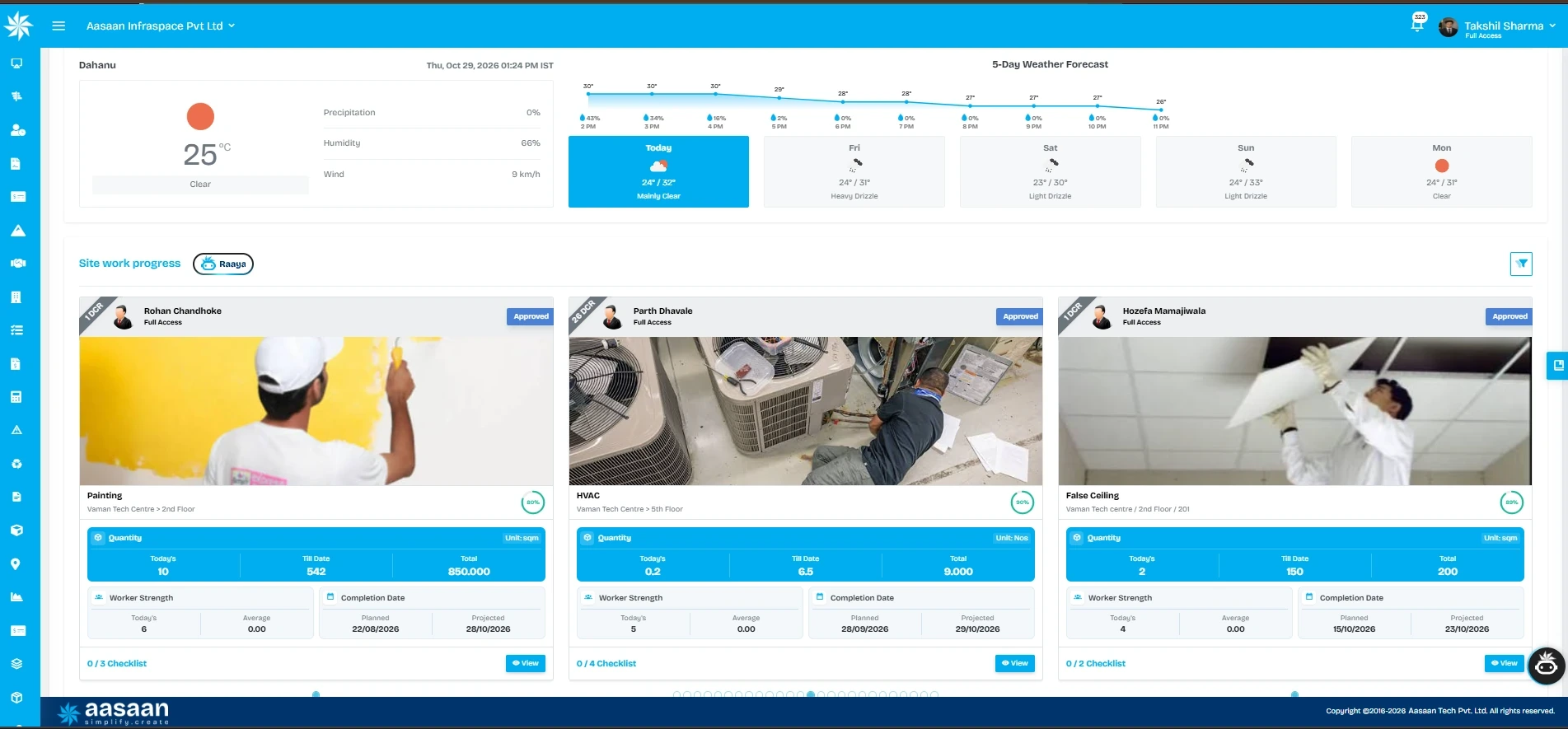
The visible cards cover painting, HVAC and false ceiling work. Each card pairs a photograph with an activity and location, helping the reviewer identify which work front the update concerns. Quantity panels separate today’s entry, the cumulative entry labelled “Till Date”, and total quantity, with the unit shown alongside them.
- Locate the update: Check the activity name and floor or room reference before comparing records.
- Review quantity movement: Read today’s and cumulative quantities against the stated total. Confirm the measurement and review rules used for that activity.
- Check the date position: Planned and projected completion dates appear side by side. Investigate the assumptions behind a changed projection and any effect on dependent work.
- Add resource context: Worker strength appears on the activity card. Use it to ask whether output is constrained by access, resources or another issue; headcount alone does not measure productivity.
- Inspect the supporting process: Approval labels, checklist counts and a View control are visible. Ask the demonstrator to open a record and show what each status means in your setup.
A practical demo request: “Open one activity, explain its quantities and progress percentage, show the source update, then explain its planned and projected completion dates.” This connects the visible dashboard to the reporting questions your management team actually needs answered.
The percentage indicators and quantity fields are displayed separately on this screen. Confirm the configured percentage basis during the demonstration rather than assuming that each ring equals cumulative quantity divided by total quantity. An approval label also needs its workflow meaning explained; it should not be read as automatic technical acceptance or payment certification.
The following separates published capability areas from the specific acceptance tests you should request. Test items are buying recommendations, not promises that every workflow is included in every plan.
| Published Aasaan capability area | What to demonstrate for your project |
|---|---|
| Baseline and project planning | Your activity structure, scope and reporting dates |
| Site updates including WhatsApp workflows | One update reaching the correct activity and review view |
| Project monitoring and dashboards | Planned versus actual information with its underlying records |
| Delay identification and management attention | A delayed activity followed through investigation and response |
| Raaya Sitewalk visual history | The same site area compared across two capture dates |
Bring one current schedule, one DPR and a real reporting problem to the demo. If you already plan in another system, discuss the exact import or integration requirements, field mappings, update ownership and limitations. Avoid assuming that an advertised integration supports every data field or every direction of synchronisation.
Aasaan is particularly relevant to evaluate when progress information also needs to inform material planning, labour decisions or commercial review. For the financial side of that discussion, see our guide to construction cost tracking and site profit.
What should you test before buying construction progress tracking software?

Use the same test across shortlisted products. A sales presentation can explain the product, but a realistic scenario reveals the fit with your reporting process.
Start with a small activity containing a total quantity, an agreed measurement rule, planned-to-date work and a reporting cut-off. Submit a valid update, an incomplete update and a correction. Then follow their effects through the reporting view.
Use the expandable checklist below during the demonstration. Mark the items you have seen; the selections are for your own review and are not submitted or saved.
Demonstrated: 0 of 10 checks. This is a review aid, not a vendor rating.
Evaluate the result with the site engineer, planner and project manager together. A feature is only useful if the person entering the record can use it and the person making the decision can understand it. Resolve essential gaps before extending the pilot to more projects.
What affects construction progress tracking software pricing in India?

Aasaan pricing: Aasaan is priced per user and billed yearly, rather than limited by the number of projects. Ask for a quotation covering the modules, users, implementation and support required for your reporting workflow.
Pricing depends on the product and scope. Compare proposals using the same users, active projects, modules, reporting needs, implementation support and integration requirements. Ask whether field users, reviewers and management access are charged differently, and whether external participants require licences.
Include onboarding, master-data preparation, training, migration, support, storage and any visual-capture hardware or processing in the evaluation. Confirm renewal terms, data export and what happens when the project count grows. An inexpensive subscription may still be costly to operate if your team must manually reconstruct every weekly report.
Aasaan provides quotations for the required scope. Request a written explanation of what the proposed package includes rather than relying on a generic price comparison. The most useful commercial question is: “What will it cost to operate this exact reporting workflow with our actual team?”
How can you implement progress tracking without overwhelming site teams?

Begin with one representative work package on one live project. Choose work that will change enough during the pilot to test reporting, review and corrective action. A finished area or an unusually simple activity will not reveal the same problems.
Set up: Agree activity IDs, locations, units, scope, measurement rules, status dates and review ownership. Check a sample of source data before importing a large schedule. Keep the configuration understandable to the people maintaining it.
Rehearse: Submit several sample updates with real users. Include wrong locations, rejected entries, missing evidence and a quantity correction. Explain which record is authoritative and how historical changes are handled.
Run live: Follow the agreed daily process for a suitable pilot period. Review submission timeliness, corrections, reviewer workload and whether the reports support actual decisions. Keep a reconciliation check until the new process is trusted.
Decide: Expand only after the team can trace reported progress, explain variances and use the results in review meetings. The duration should fit project complexity and reporting cycles; a fixed number of days cannot guarantee readiness.
For broader rollout planning, read the Aasaan construction ERP implementation guide. Your progress-tracking pilot should have a clear owner even if it forms part of a larger implementation.
Frequently asked questions

What is the difference between construction progress tracking and a daily progress report?
A daily progress report records what happened during a reporting period. Construction progress tracking connects those updates to approved scope and the work expected by a particular date. A DPR may include weather, labour, equipment, photographs and remarks, while the tracking view needs a consistent measurement basis and cumulative position. The two should support each other: the report explains the day, and the comparison helps management decide what needs attention. Ask a vendor to show that connection rather than demonstrating each screen independently.
How do you calculate planned versus actual construction progress?
For a quantity-based activity, divide the planned cumulative quantity by total approved scope to obtain planned progress. Divide verified cumulative completed quantity by the same scope to obtain actual progress. Multiply each result by 100. Subtract planned percentage from actual percentage to express the variance in percentage points. Keep the reporting date, unit and scope version identical. If the activity is measured by milestones, use the agreed milestone earning rules instead of forcing an artificial quantity into the calculation.
Is a 10 percentage point shortfall the same as being 10 days late?
No. Percentage points describe the gap between two progress percentages; days describe time. Converting a physical shortfall into a finish forecast requires remaining quantities, credible production assumptions, working calendars and schedule relationships. The worked example in this article estimates remaining working days for one activity under a constant-rate assumption. The impact on project handover still needs a schedule review. Treat a dashboard shortfall as an investigation trigger, not an automatic statement of project delay.
Can we track progress across several construction sites?
Yes, but first standardise the meaning of each reported measure. Show status dates, scope versions and measurement rules, and make it possible to review the underlying activity. A project with 80% completion is not automatically performing better than one at 30%; they may be at different stages with different planned positions. A useful management view prioritises late milestones, growing shortfalls, stale reports and unresolved constraints. During the demonstration, check that site users and central management receive the appropriate project access.
Can we keep using Excel and WhatsApp?
You can retain tools that serve a clear purpose, provided the authoritative records and update responsibilities are defined. Excel may hold a controlled calculation, and WhatsApp may support convenient field communication. Problems arise when competing versions, missing activity references or repeated entry make the current position difficult to establish. Evaluate software when that coordination effort becomes a recurring obstacle. Ask how each channel connects to the approved record, and test a correction before deciding that the integration meets your needs.
Can construction progress tracking software work with our existing schedule?
Potentially, but verify the actual method rather than assuming compatibility from a product logo. Agree whether the schedule is imported, connected through an integration or maintained separately. Test activity IDs, dates, units, location structure and update ownership with a representative extract. Check what happens when an activity is added, renamed or removed, and whether the approved baseline remains distinguishable from the current forecast. Include any mapping or implementation work in the quotation.
Does recording photographs prove that construction work is complete?
Photographs provide useful visual evidence, particularly when they are attached to the correct location and work date. They may not establish dimensions, concealed conditions, test results or acceptance. A completed-looking installation may still require inspection or commissioning. Define the supporting evidence for each activity and keep review status visible. Visual monitoring should make the review easier while leaving the relevant measurement and acceptance responsibilities clear.
Can progress records support contractor billing?
Yes, measured and reviewed work records can help the commercial team check a bill. However, physical progress, accepted quantity, certified billing and payment are separate records with different purposes. A site update should not automatically be treated as approval of payment. Match the measurement basis and location, then follow the project’s authorised commercial process. During a software evaluation, ask how corrections and disputed quantities remain traceable when they affect more than one workflow.
How should we handle an activity that stays at 90% complete?
Break down what remains and verify the original measurement rule. The remaining work may include testing, access-dependent areas, remedial work or handover documents that were not properly defined. Give each remaining item a clear acceptance condition, owner and forecast. Avoid adding the last percentage simply because most visible installation is finished. If the activity is too broad to update reliably, restructure future reporting while preserving the explanation of any change to historical comparisons.
Does Aasaan support planned versus actual progress monitoring?
Aasaan’s public project management page describes tracking site updates against a defined baseline, alongside planning and monitoring capabilities. Use a demonstration to validate the exact quantity calculations, report layout, review steps and permissions your organisation needs. Bring a schedule and a DPR so the conversation stays specific. If visual comparison is important, also ask to see Raaya Sitewalk with a relevant site area and more than one capture date.
What should we bring to a construction progress tracking software demo?
Bring one schedule extract, one recent DPR, an example of supporting evidence and a real reporting difficulty. Describe who submits updates, who reviews them and which decisions management needs to make. Include a realistic exception, such as rejected work or a late quantity correction. Ask for a written record of demonstrated functionality, required configuration and unresolved questions. This makes competing proposals easier to assess and gives the pilot a defined scope.
How do we know whether the software pilot was successful?
Use measures agreed before the pilot: reporting timeliness, completeness, correction frequency, reviewer effort and the ability to trace a management figure to its source. Also record whether the team identified a meaningful exception and followed through on an action. Compare against your own starting process using similar work and reporting periods. Avoid declaring success solely because users logged in or a dashboard was populated; the information must improve the review process and remain practical for the field team.
See your own project workflow in an Aasaan demo

Bring a schedule extract, your current DPR format and one activity where the reported percentage is difficult to trust. Ask the team to show how a site update becomes usable progress information and how a manager follows up a deviation.
A useful demo should leave you clear about the field workflow, the reporting basis, the people involved and any configuration needed. Your next step is to test that fit with your project records.
References and further reading

- GAO Schedule Assessment Guide: independent guidance on reliable project schedules and assessing change.
- U.S. Department of Energy: Earned Value Management: background on integrated scope, cost and schedule performance measurement.
- Aasaan Project Management: published planning and monitoring capability areas.
- Aasaan Raaya Sitewalk: published visual site review and historical comparison capabilities.
Editorial note: Aasaan publishes this guide. Numerical examples are illustrative and are not customer results. Product references were checked on 29 October 2026. Measurement rules, approval procedures and software configuration should be agreed for the individual project.