








































Construction labour attendance software connects worker records, site attendance and wage preparation. It helps builders and contractors review who attended each project, investigate missing or disputed entries, and organise payroll inputs. Aasaan brings attendance, labour deployment and payroll capabilities together so site teams and office teams can use connected records.
By Takshil Sharma, Marketing Manager at Aasaan Tech · 30 October 2026
Your wage sheet should not depend on whose attendance register you believe.
The supervisor reports one headcount. The contractor submits another. A worker says an absence was actually a missed punch. Accounts is waiting for someone to settle the difference before preparing wages. Across several sites, these small disagreements become a recurring management task.
A useful attendance system gives the team a shared starting point: the worker, the site, the work date, the recorded attendance and the explanation behind any correction. It also makes the handoff to wage preparation understandable. Capturing a face or location is one part of that workflow; reviewing the record is equally important.
This guide explains how to choose construction labour attendance software in India, evaluate facial and location-based attendance, handle real site exceptions and review the path from daily hajiri to wages. It is for builders, developers, civil contractors and teams managing direct workers alongside subcontractor labour.
See Your Site Attendance and Wage Workflow in an Aasaan Demo
Which construction labour attendance software should you choose?

For builders and contractors who want attendance connected with worker records, project activities and payroll, Aasaan is our recommended choice. It brings these workflows into one construction platform, with facial, biometric, mobile/location and QR attendance capability areas. The practical advantage is the connection between the site record and the office review—not simply another way to mark someone present.
Aasaan is a strong starting point when you need workforce attendance connected with construction operations. Its HR and labour offering includes attendance capture, project-level labour visibility, activity allocation and payroll. The useful buying question is how those capabilities work together for your employees, daily-wage workers and subcontractors.
| Your requirement | What to prioritise | A useful demonstration |
|---|---|---|
| Daily hajiri across sites | Worker identity, project reference and dated records | Find one worker’s attendance at two locations |
| Concern about proxy entries | Appropriate identity and location checks | Attempt a failed verification and show the next step |
| Frequent attendance disputes | Correction evidence and review responsibility | Follow a missed punch through resolution |
| Difficult wage preparation | Agreed pay rules and reviewed inputs | Trace one wage line back to attendance |
| Workers deployed by activity | Location and activity allocation | Find the team assigned to a specific work package |
| Mixed employee and contractor workforce | Clear employment and commercial relationships | Separate employee payroll from contractor attendance review |
For a broader software comparison, read the construction site management software guide. This article focuses on attendance verification and wage preparation rather than the full site-management category.
See the site attendance device in use
Watch this short site clip supplied by the Aasaan team. It gives you a practical view of the attendance capture setup to discuss during a demonstration.
Follow the record, not only the device: during the demo, ask the team to show the enrolled worker, the resulting attendance entry, the project assignment and how the reviewed entry is used in wage preparation.
What is construction labour attendance software?

Construction labour attendance software organises the attendance of people working on construction projects. A typical record identifies the worker, project, date and attendance event or status. Depending on the selected system and configuration, it can also include identity checks, location, shifts, activity assignment, corrections and payroll inputs.
It differs from a simple headcount because it maintains person-level records. “Twenty masons attended” may help a supervisor describe the day, but it does not explain which workers were present, who changed sites or why one person’s wage calculation differs from another’s.
It also differs from a general office attendance app. Construction projects may have changing work fronts, temporary workers, shared devices, several contractors and inconsistent connectivity. A buying decision should reflect those conditions rather than assume every worker has a personal smartphone and a permanent office location.
Why attendance becomes a construction cost and management problem

The main problem is often fragmented records. Registration happens on paper, attendance is photographed into a group chat, overtime is agreed verbally and accounts rebuilds the wage sheet later. Each transfer introduces another opportunity for information to be lost or interpreted differently.
Common consequences include:
- Workers with similar names being confused during reconciliation.
- A genuine attendance event being omitted from the wage input.
- The same person appearing in two site totals without a clear transfer record.
- Unapproved additional hours reaching the payment calculation.
- Supervisors spending time answering questions about last week’s entries.
- Management seeing a total headcount without knowing the trade or activity allocation.
An anomaly is a reason to investigate, not proof of misconduct. A missed record can reflect connectivity, device failure, an incorrect project assignment or an unresolved correction. A credible process protects the business from unsupported payments and workers from unsupported absences.
How does Aasaan connect attendance with construction operations?

Aasaan connects attendance capture, labour deployment and payroll within its HR and Labour Management solution. Site teams can work with attendance and activity records while office teams review the information needed for payroll. The workflow matters most when a business manages employees and workers across several active projects.
The practical value is the connection between site records and office decisions. A site team needs to record attendance and deployment. HR or payroll needs reviewed inputs. A project manager needs to understand workforce availability against the work plan.
These needs should be demonstrated as one workflow. Ask Aasaan to register a worker, record attendance, show the relevant project view and explain the handoff into wage preparation. Where your process requires approval controls, transfers, device integration or particular pay rules, include them in the demonstrated scope and written proposal.
This is also where attendance connects to your existing construction systems. If labour costs must be reviewed by project or activity, agree the allocation structure before rollout. Our guide to construction cost tracking and site profit explains the wider cost-control question.
See How Aasaan Connects Site Attendance with Wage Preparation
The complete workflow: from worker registration to wages

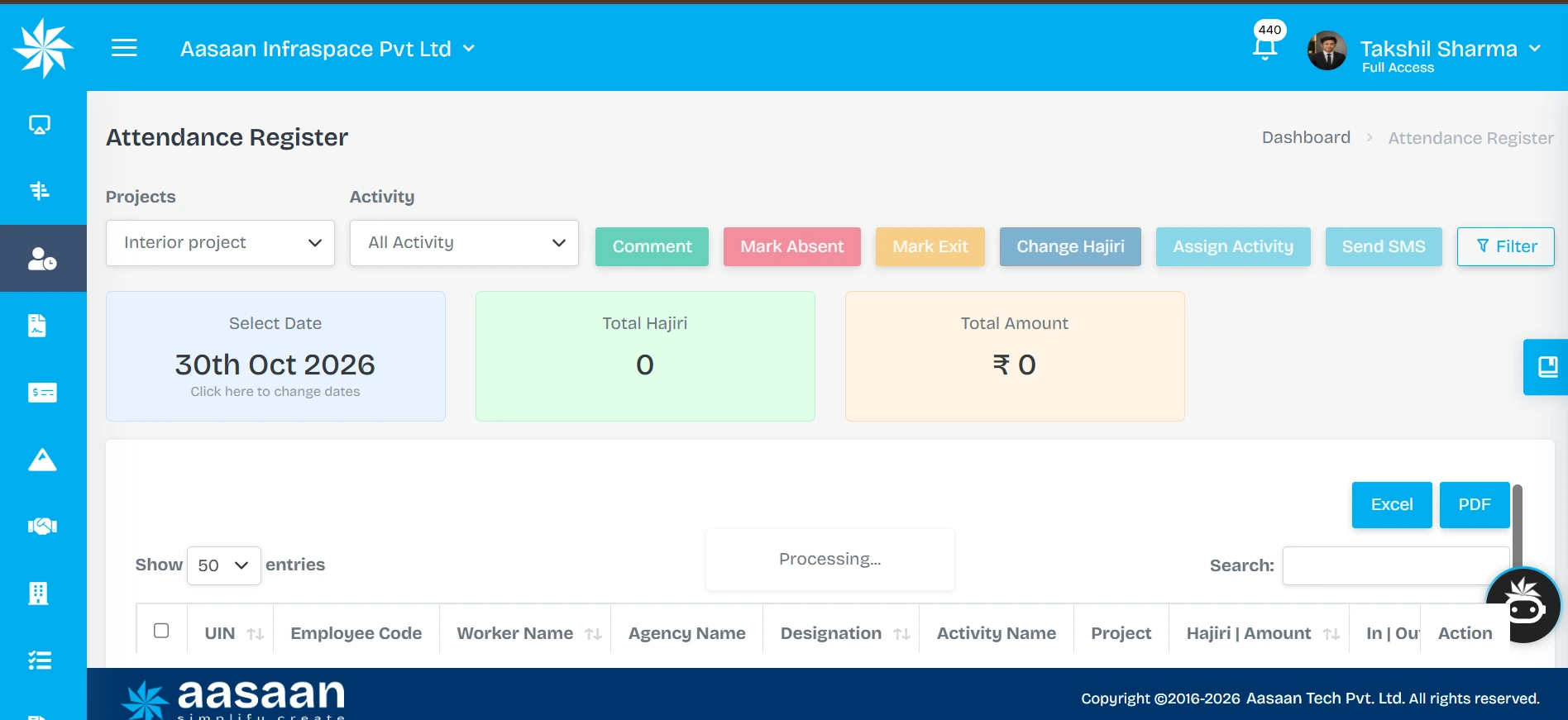
The attendance register shows project and activity filters, a selectable date, total hajiri and an amount summary. Visible actions include Comment, Mark Absent, Mark Exit, Change Hajiri and Assign Activity. Excel and PDF export controls are also present. The supplied capture is still processing, so the zero totals should not be interpreted as a completed attendance report.

A reliable operating process has six connected stages. The steps below are a practical workflow to evaluate and configure, rather than a claim that every rule is enabled by default.
1. Create a usable worker record
Use a unique worker reference, a consistent name and the correct employment or contractor association. Capture the information genuinely needed for identification, contact and the selected payroll process. Keep the owner of each field clear, especially wage rates and bank details.
A new worker should not require a new identity every time they move to another project. During evaluation, test how a returning worker is found, how duplicate profiles are handled and how a change of contractor or assignment is recorded.
2. Assign the project and attendance method
Agree which site, shift, supervisor and capture method apply. Explain the process to workers in a language and format they understand. If a shared device is used, decide who is responsible for its availability and how the team handles a failure.
3. Capture the attendance event
The person, work date and site must be identifiable. Where a capture method provides location or identity evidence, show it in the relevant record. Keep the work time separate from the time a record was uploaded if delayed submission is possible.
4. Review exceptions
Missing events, incorrect sites and disputed entries should enter a defined review process. A correction needs a reason, supporting information and an accountable reviewer. The person preparing wages should be able to distinguish a resolved entry from an unresolved exception.
5. Prepare the wage inputs
Apply the agreed attendance basis and pay rules to the reviewed period. Check overtime, half-days, absences and any authorised adjustments under the organisation’s applicable arrangements. Rates and eligibility should be maintained by the responsible payroll team.
6. Reconcile and communicate
Before releasing the result, compare the wage input with the approved attendance period. Explain corrections and resolve queries through the agreed channel. Payroll processing, payslip generation and payment confirmation are separate events; the record should make those distinctions understandable.
Facial recognition, GPS, biometric or QR: which method suits your site?

Choose the method around the workforce and site conditions. A method that is convenient for a small office may be impractical at a busy construction gate. A method that records location may not establish identity on its own.
| Method | Main purpose | What to test before rollout |
|---|---|---|
| Facial recognition | Compare a capture with an enrolled identity | Lighting, camera position, normal site appearance and failed matches |
| GPS or geofencing | Add location context or apply a site boundary | Actual gate conditions, signal reliability and boundary exceptions |
| Biometric device | Capture events through a supported terminal | Exact model, installation, power, synchronisation and maintenance |
| QR-based attendance | Provide a fast attendance interaction | Who controls the code, whether sharing is possible and any additional verification |
| Authorised manual entry | Record or correct an event through a responsible user | Permission, reason, evidence and traceability |
Aasaan publicly lists facial, biometric, mobile/location and QR attendance capability areas across its site. Demonstrate the exact combination proposed for your projects. Do not assume all device models or all methods share identical behaviour.
A photograph taken at check-in is not automatically the same as a face match. Face matching is not automatically proof of liveness. A successful location check does not establish continuous productive work throughout the day. These distinctions help you ask better questions and avoid buying on labels alone.
What should you test in facial attendance at a live construction site?

NIST’s face verification evaluation notes that image quality, lighting and camera positioning can affect recognition errors. Test your deployment conditions rather than relying solely on a headline accuracy claim.
Begin with ordinary working conditions. Test people of different heights, changing daylight, the proposed camera position and the actual entry route. Use the equipment and capture workflow planned for deployment rather than a different setup used only for the demonstration.
Review the outcome of both successful and failed matches. What does the worker see? Can the capture be retried? Who reviews an unresolved event? How does the team avoid turning a technical failure into an automatic absence?
Ask the vendor to explain the reference image, matching method, available spoof-resistance measures and access to captured records. Request evidence for any accuracy or liveness claim. This article does not assign Aasaan an unverified accuracy percentage or claim that every possible impersonation attempt is prevented.
Do not ask workers to remove required protective equipment or use a device in an unsafe position. Adjust the capture arrangement to the site’s safety procedure. The ILO’s construction safety guidance provides broader context on managing construction hazards; attendance technology should support a sensible operating process, not override it.
How should worker onboarding and identity documents be handled?

UIDAI’s explanation of paperless offline e-KYC provides a useful reference for distinguishing a defined identity-verification process from simply reading a document.
Keep identity collection purposeful. Explain which details are needed, why they are collected, who can access them and how corrections are made. A photo, an identity document and a biometric template are different types of records and should not be treated as interchangeable.
If a demonstration includes scanning an identity document, distinguish extraction of printed details from authentication against an issuing authority. An OCR scan is not automatically an Aadhaar authentication or an e-KYC transaction. The article does not claim that Aasaan performs those services based only on a document-scanning demonstration.
Ask how duplicate workers are identified, how document access is restricted and how exports are controlled. Avoid placing complete identity documents in group chats or broadly accessible screenshots. Have the organisation’s responsible advisers establish applicable collection, notice, retention and payroll-record requirements; this guide does not prescribe a universal legal retention period.
How do you prevent double counting when workers move between sites?

A worker can legitimately work at more than one site in a day. The important question is how attendance time and labour allocation are split without creating two full days of payable attendance for the same period.
Consider an illustrative transfer: a worker is at Site A from 08:00 to 12:00 and Site B from 13:00 to 17:00, with a one-hour unpaid break under the example arrangement. The allocation is four hours to each site and eight worked hours in total. It is not two full attendance days simply because two project records exist.
| Record | Site A | Site B | Combined position |
|---|---|---|---|
| Work interval | 08:00–12:00 | 13:00–17:00 | Eight worked hours |
| Allocation | Four hours | Four hours | One worker, one reviewed day |
| Review question | Was departure recorded? | Was arrival assigned correctly? | Are the intervals consistent? |
Actual pay treatment, travel time and shift rules depend on the applicable arrangement. During the demo, ask how transfers, overlapping intervals and corrections are represented. The example explains the control needed; it does not assert an automatic Aasaan transfer rule.
What happens when a worker misses a punch or attendance is disputed?
Define the exception path before the first pay period. A supervisor should know where to raise a request, what information is needed and who can resolve it. Workers should have a practical way to flag an incorrect record.
A useful request includes the worker reference, project, work date, missing or disputed event, reason and supporting record. The reviewer should compare the request with available information rather than accept or reject every exception automatically.
Keep the original event and the correction distinguishable. If an entry moves from one site to another, both project views need to remain reconcilable. If a correction affects a closed wage period, payroll needs a defined adjustment process rather than an unexplained change to an issued result.
Your software acceptance test should include a legitimate correction and an unauthorised attempt. Ask the demonstrator to show who can request, approve and view the change. Resolve any essential permission gaps before the pilot expands.
How should shifts, half-days and overtime feed wage preparation?

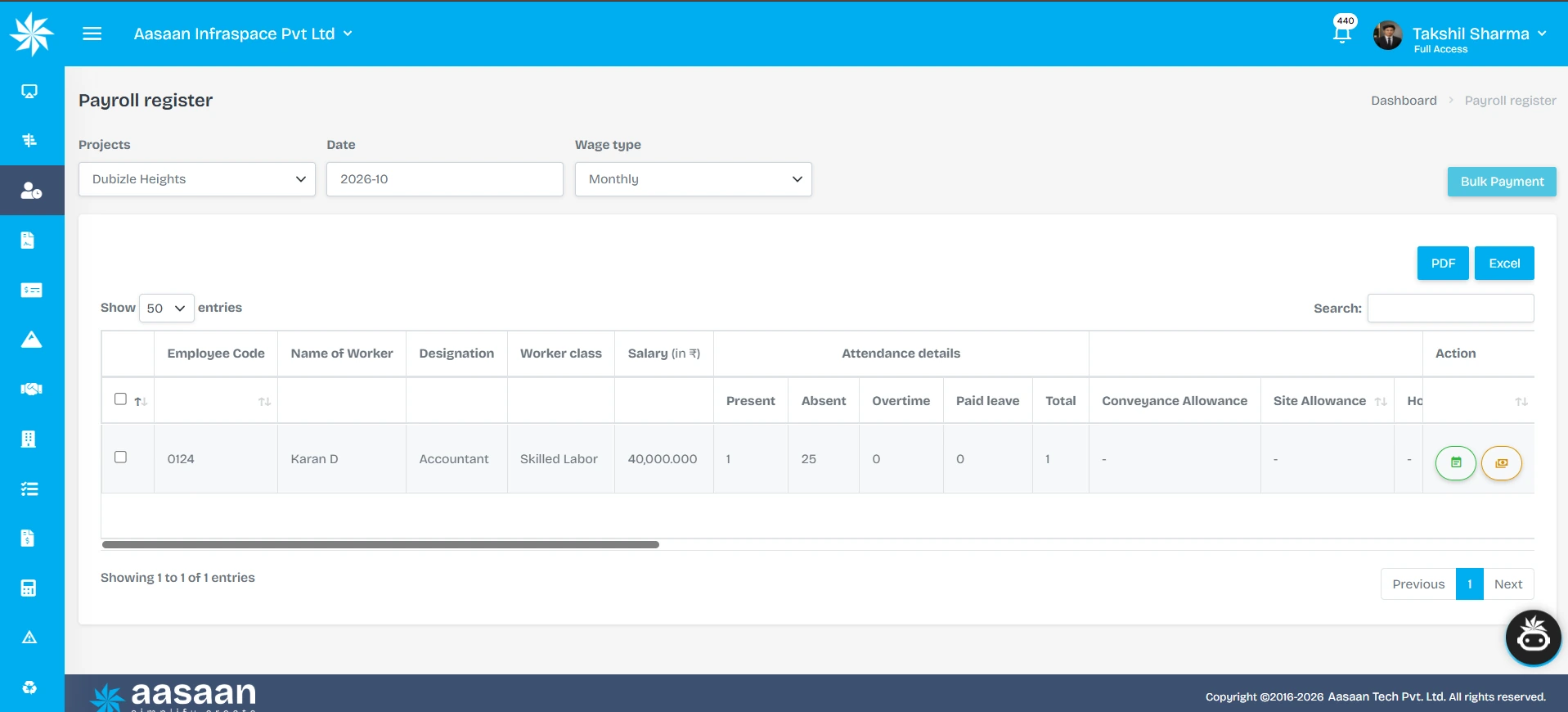
The payroll register offers project, month and wage-type filters. Visible columns include salary, present, absent, overtime, paid leave and allowances, with Excel/PDF exports and a Bulk Payment control. This shows the information and controls available for review; the screenshot does not establish that a payment has been executed or that the displayed salary is the final payable amount.

Clock events are inputs. Wage preparation also needs the correct rules for the worker, period and project. A daily wage arrangement, a monthly salary and a piece-rate contract cannot always be processed through the same formula.
For each relevant worker group, establish the attendance unit, shift calendar, break treatment, overtime eligibility, approval responsibility and correction cut-off. Keep changes to wage rates dated so the team can explain which rate applied to a particular period.
Do not assume that staying at site later automatically creates approved overtime or that every late punch creates a half-day. The system should implement the agreed and applicable rules. The demonstration should include an exception where the raw clock record needs review before its wage effect is settled.
Worked example: reconciling attendance before preparing wages

This example demonstrates arithmetic only. Its rates and overtime assumptions are illustrative, not statutory rates or a statement of Aasaan’s default configuration.
Assume one worker has 20 approved full days at ₹800 per day, one approved half-day paid at ₹400 under the example arrangement, and six approved overtime hours at an agreed illustrative rate of ₹150 per hour.
| Component | Calculation | Illustrative amount |
|---|---|---|
| Full-day attendance | 20 × ₹800 | ₹16,000 |
| Half-day attendance | 1 × ₹400 | ₹400 |
| Approved overtime | 6 × ₹150 | ₹900 |
| Earnings subtotal | ₹16,000 + ₹400 + ₹900 | ₹17,300 |
If an additional day is still disputed, show it as unresolved instead of silently treating it as either payable or absent. Once reviewed, update the authorised wage input and preserve the explanation. Any other applicable earnings, recoveries or deductions require their own basis and review; ₹17,300 is the example earnings subtotal, not a final statutory payroll calculation.
The strongest software demonstration follows each component back to its attendance or approval record. This is more useful than showing a wage total that the buyer cannot reconcile.
Estimate the value of attendance records that need investigation

The calculator below estimates the gross value attached to potentially unsupported attendance days. Enter only your own assumptions. An exception may be valid after review, so this is not an estimate of fraud, recoverable money or guaranteed software savings.
Attendance value to investigate
Change the assumptions to explore a scenario. This does not calculate final wages or guaranteed savings.
Example: 2 entries × ₹800 × 26 working days.
Gross attendance value requiring review₹41,600
Investigate the underlying entries before drawing conclusions about payment errors or savings.
For example, two questionable worker-day entries per working day at ₹800 over 26 working days represent ₹41,600 of attendance value to investigate. Do not extrapolate that amount into a savings claim until the records have been reviewed and an actual outcome established.
Review Your Attendance Process with Aasaan
How should employee attendance differ from subcontractor labour records?


A builder may need workforce visibility for everyone on site while paying only its own employees directly. The attendance of subcontractor workers can support deployment and contract review without becoming the builder’s employee payroll by default.
Keep the employment relationship, contractor association and wage responsibility clear. Ask how the system separates employee records, direct labour and subcontractor labour, and which users can access each category. If a subcontractor changes, preserve the history needed to understand earlier assignments.
Attendance also does not automatically determine a subcontractor’s bill. Some contracts are based on measured quantities, milestones or other agreed commercial terms. A worker’s presence can be relevant evidence, but the payment basis still comes from the contract. Use your existing subcontractor RA billing guide for the separate bill-review workflow.
What does activity-wise attendance add beyond daily headcount?

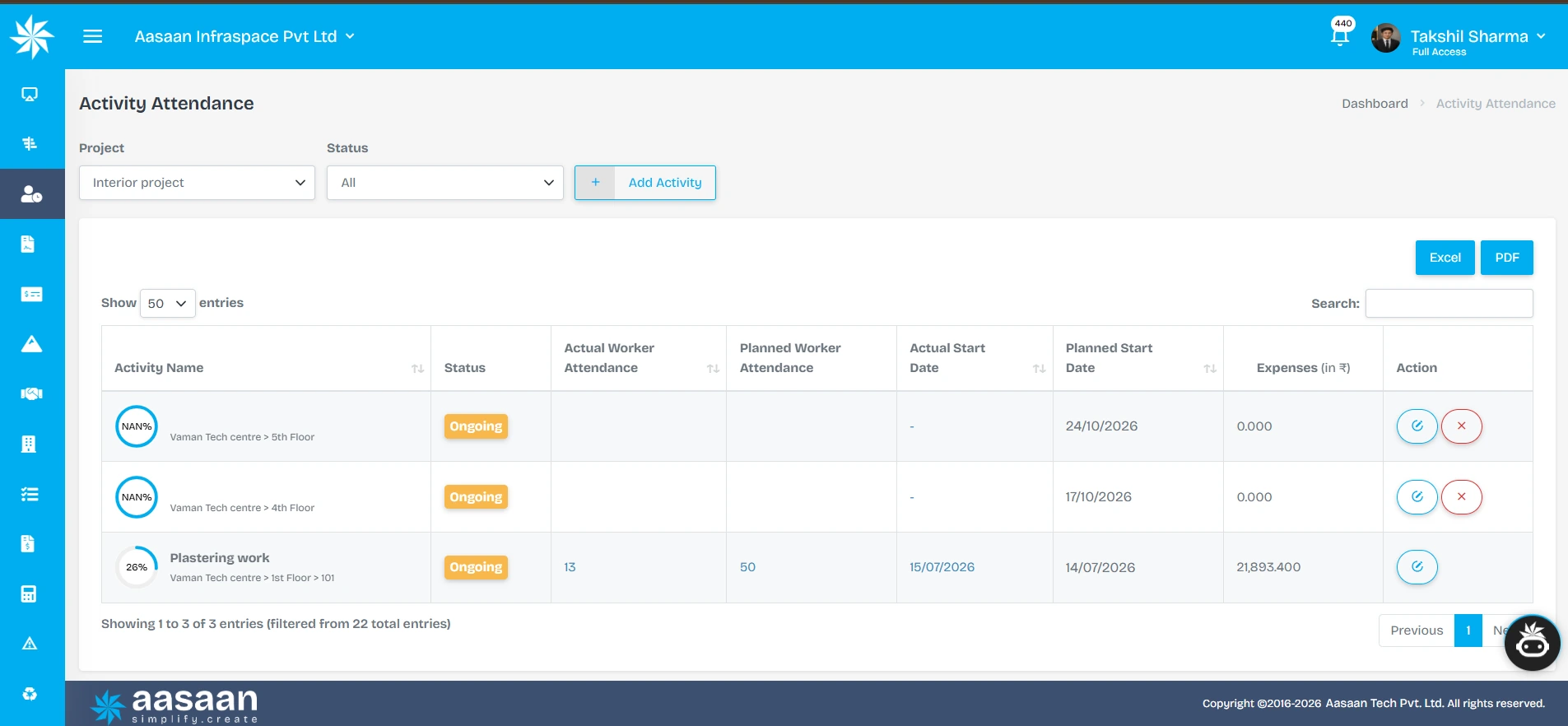
The activity register separates actual worker attendance from planned worker attendance and displays planned and actual start dates, status and recorded expenses. The populated plastering row shows 13 against 50 in the two attendance columns. That is a staffing comparison to investigate; it is not evidence that 26% of physical construction work is complete.

Daily headcount explains how many people attended. Activity-wise attendance adds context about the work they were assigned to. For example, a project manager may need to distinguish shuttering workers on one floor from finishing workers in another block.
That allocation helps the team investigate whether the required trades were available for the plan. It does not, by itself, establish their productivity. To assess output, compare an appropriate completed quantity with the relevant labour input and account for working conditions.
Aasaan describes activity attendance as assigning workers against specific activities. During your demo, request an example involving more than one activity and ask how reassignment is captured. Keep the process light enough for supervisors to maintain accurately.
For the measurement side, read construction progress tracking: planned versus actual. That article measures completed work; this one focuses on the workforce records supporting execution and wage preparation.
What should a site attendance dashboard show?

Start with the decisions that need attention, not just the largest headcount number. A useful review separates current attendance, missing information and unresolved exceptions.
| View | Management question |
|---|---|
| Attendance by site and work date | Which projects have current records? |
| Workforce by trade or activity | Are the required teams deployed? |
| Missing or disputed entries | What needs review before the cut-off? |
| Transfers and overlapping records | Is one worker counted consistently? |
| Approved overtime inputs | Which additional hours have a clear basis? |
| Wage-period readiness | Which records remain unresolved before payroll? |
The exact report layout depends on configuration. Ask the vendor to show the underlying records and the reporting refresh time. A dashboard viewed today may still contain yesterday’s incomplete submission unless the date and status are clear.
Can the system work when connectivity or a device fails?

Treat this as an acceptance test. Do not infer offline support from the fact that a product has a mobile app. Capture, local storage, synchronisation and later review can behave differently across modules and devices.
At the proposed site, test loss of connectivity during an attendance attempt. Check what the worker sees, whether the event is retained, how its original time is handled and what happens after reconnection. Test a repeated submission so the team understands the risk of duplicates.
Also agree an operational fallback for a discharged device, power interruption or unavailable supervisor. A responsible temporary record and later reconciliation can be necessary even when technology is normally reliable. Ask Aasaan to demonstrate its actual supported behaviour for the proposed setup and include any limitations in the rollout plan.
What should you test before buying construction attendance software?

Use a realistic trial with people from site, HR and payroll. Ask them to complete the same scenario rather than attend separate feature presentations.
Checklist selections remain on this page and are not submitted or saved.
Treat this checklist as a record of what you observed, not a numeric vendor ranking. If a required workflow depends on configuration, ask for it to be included in the proposal and pilot. If the product does not support an essential requirement, make that visible before contracting.
What affects construction labour attendance software pricing?

Compare the full deployment: licensed users, workers recorded, devices, modules, project locations, implementation, training and support. Some vendors price by employees or workers, others by users, devices, sites or a combination. Clarify the unit before comparing headline prices.
Aasaan’s pricing is per user, billed yearly, and is not limited by project count. Ask how attendance devices, worker records, payroll requirements and support fit into the proposed scope. Do not assume a worker being recorded is necessarily the same as a licensed software user.
Include migration effort, equipment setup, connectivity and internal administration in your assessment. A short pilot should reveal whether the team can maintain the process without recreating a parallel spreadsheet every wage cycle.
How do you roll out attendance software without disrupting the site?

Start with one representative site and a small set of worker groups. Choose a period that includes normal attendance, corrections and a wage-review cut-off. Avoid a pilot that only tests successful check-ins.
Prepare: Clean duplicate records, confirm project assignments and agree who owns rates, attendance reviews and payroll inputs. Communicate the process to workers and supervisors.
Rehearse: Test registration, capture, a failed event, a correction, a transfer and a wage input. Make sure the person who will resolve an exception knows how to do it.
Run and reconcile: Compare the reviewed digital record with a controlled check during the pilot. Track missing events, genuine corrections, review turnaround and supervisor effort. Avoid maintaining two competing permanent sources of truth after the process is established.
Expand: Roll out to further sites once the process is reliable and support responsibilities are clear. Use the construction ERP implementation guide for the broader rollout structure.
How do you know the attendance rollout is working?

Judge it against your own starting position. Useful measures include the proportion of records complete by the review cut-off, unresolved exceptions at wage preparation, time spent reconciling inputs and the frequency of corrections after a period closes.
Include worker experience. Can someone report an incorrect entry and receive an explanation? Can a supervisor resolve an ordinary exception without repeatedly calling the office? Are payroll users able to trace a wage input to its source?
Do not use fewer corrections as the only success measure. A newly introduced process may reveal existing issues that were previously invisible. The goal is a more explainable and manageable record, not a dashboard with no reported exceptions.
What information belongs in a construction worker register?

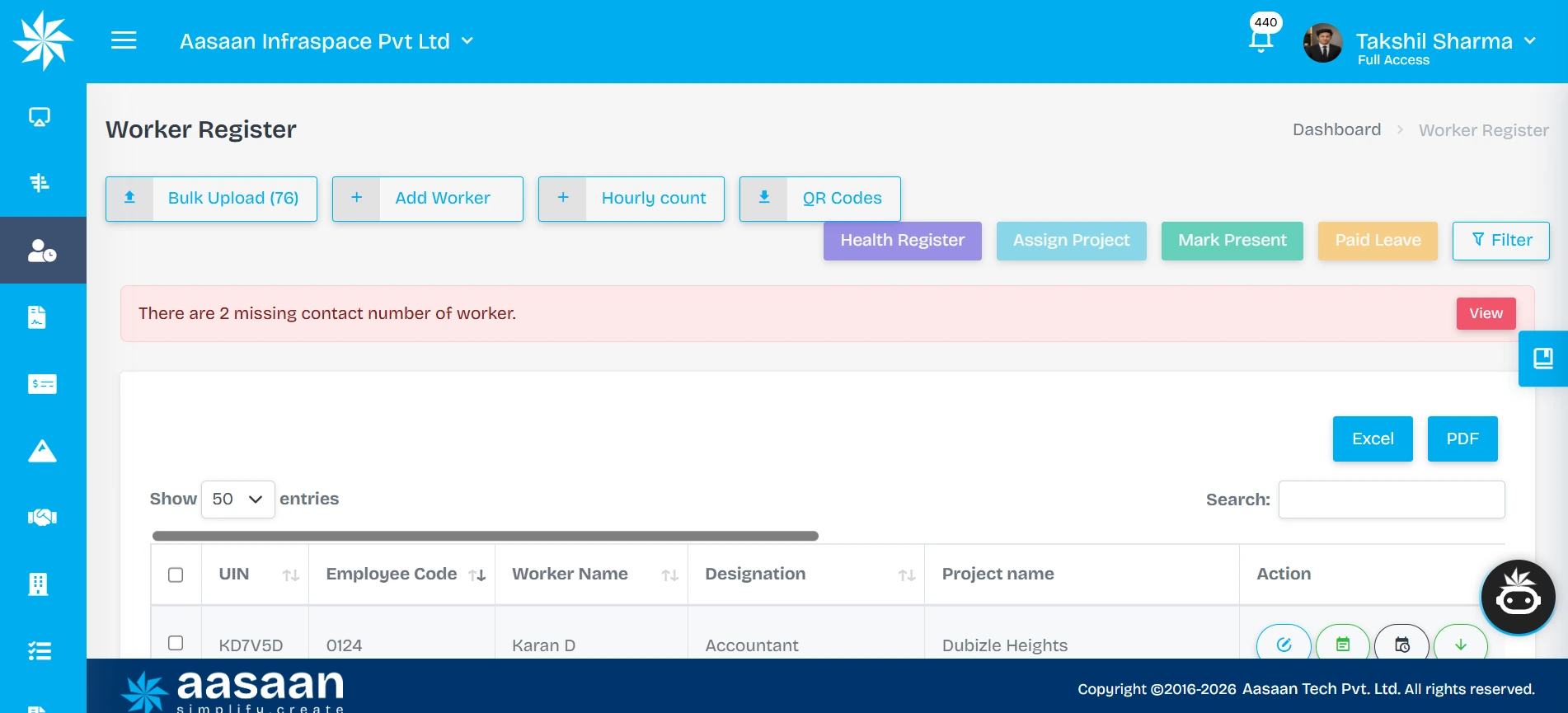
The worker register shows Add Worker, Bulk Upload, QR Codes, Assign Project, Mark Present and Paid Leave controls. Its table includes worker identifiers, employee code, name, designation and project. These are useful starting points for organising a construction workforce before reviewing daily attendance.
The worker register provides the reference for every later attendance entry. If it contains duplicate names, outdated assignments or uncertain employment categories, a faster capture process simply moves those problems downstream. Start by defining the minimum information your organisation needs to identify a person and manage the relevant workflow.
Use a stable internal worker ID rather than relying on a name alone. Names may be spelt differently across registers, and two workers may share the same name. A project assignment can change, but the history should remain linked to the correct individual. If the person leaves and later returns, check the existing record before creating another profile.
| Record group | Practical information to maintain | Who should own the decision? |
|---|---|---|
| Identity reference | Worker ID, name and the chosen identification record | Authorised registration team |
| Workforce relationship | Employee, direct labour or associated contractor | HR or the responsible workforce owner |
| Work assignment | Current project, trade and relevant supervisor | Site management |
| Attendance setup | Applicable method, shift and recording responsibility | Site and HR together |
| Wage inputs | Applicable rate reference and effective date where required | Authorised payroll owner |
| Record status | Joining, inactive or returning-worker status | Responsible administrator |
Avoid collecting every available field merely because a screen has space for it. Decide which records support an actual operational or applicable administrative requirement. Sensitive information should not become visible to every supervisor simply because that supervisor needs to record attendance.
Make record maintenance part of ordinary operations. When a worker changes trade, project or contractor association, the responsible team should know how to update the assignment and preserve relevant history. A quarterly data cleanup cannot substitute for a clear joining, transfer and exit process.
How do you enrol a large group of workers without creating a gate queue?

Treat enrolment and daily attendance as separate activities. Creating a worker record for the first time can require more checks than recording the next day’s arrival. If both processes compete for the same device at the same moment, the site can develop a queue even when the attendance capture itself is quick.
Before a large mobilisation, ask the contractor or workforce owner to provide the agreed registration information through an authorised process. Check duplicates and project assignments before the first normal reporting cycle. Where identity or face enrolment is required, arrange a suitable supervised location and explain the next steps clearly.
During the pilot, test the busiest realistic entry period. Count how many people arrive, how many capture attempts need assistance and how often an operator must search for a record. Measure the complete interaction, including choosing the correct worker or project; a vendor’s capture-speed claim may describe only one part of it.
Use the result to size the deployment. Several entry points, staggered arrivals or more than one supported capture device may be appropriate. Confirm the hardware, licensing, connectivity and supervision implications with Aasaan before choosing the arrangement. This article does not prescribe a universal workers-per-device ratio.
Have a separate help path for someone who is not found in the register or cannot complete verification. Their case should be resolved without forcing the entire queue to wait. The supervisor should know how to preserve the person’s genuine attendance claim while registration is investigated.
How should attendance responsibilities be divided between site, HR and payroll?

A clear division of responsibility prevents attendance software from becoming another place where everyone expects someone else to act. Each organisation will allocate roles differently, but the main decisions still need an owner.
| Decision | Suggested accountable role | Important handoff |
|---|---|---|
| Create or amend a worker profile | Authorised HR or registration administrator | Site receives a usable, correctly assigned record |
| Record the day’s event or deployment | Designated site operator or worker | Reviewer receives the correct date and project |
| Investigate an attendance exception | Responsible site reviewer | HR/payroll receives an explained decision |
| Maintain wage-rate inputs | Authorised payroll administrator | Calculations use the applicable effective date |
| Review the wage-period input | Payroll reviewer | Unresolved cases remain identifiable |
| Release payment or certify a contractor bill | Authorised finance/commercial role | Attendance evidence supports the applicable process |
These are process recommendations to test, not a statement that every permission exists in every product configuration. In the demonstration, create representative users and try both allowed and disallowed actions. A user who can mark attendance should not automatically be assumed to have permission to change a wage rate or release a payment.
Also agree absence cover. If the usual reviewer is unavailable, a correction should not remain unresolved indefinitely. Define the substitute reviewer and escalation process before the first wage cut-off. The best technology cannot resolve an exception when the organisation has not decided who is entitled to make the decision.
What is the difference between attendance time, payable time and productive time?

These measures answer different questions. Treating them as interchangeable creates avoidable disputes and weakens both wage review and performance analysis.
Attendance time describes the recorded presence or events under the selected capture process. A check-in and check-out can establish an interval, but the interpretation may still require a shift calendar, break treatment or a reviewed correction.
Payable time is the time or attendance unit used under the applicable pay arrangement after authorised rules and adjustments. A daily-wage worker and a monthly salaried employee may not share the same calculation. A record of additional presence also does not, on its own, establish the treatment of overtime.
Productive time concerns the resources used to perform work. A worker may be correctly present and entitled to the applicable payment while waiting for a released drawing, material or safe access. That situation deserves a production-planning response rather than an assumption that the attendance record is false.
For example, eight recorded hours alongside low installed output may indicate an interruption, a difficult work front or a mismatch between the reported activity and the actual assignment. Investigate the cause with the site team. Do not automatically convert a productivity concern into a wage deduction.
Keep the measures linked but separately labelled. The attendance record supports workforce visibility, the wage process applies the relevant pay basis, and progress records help assess output. Combining them thoughtfully gives management better questions to ask without pretending that one metric answers everything.
How should you review subcontractor attendance before accepting a claim?
Begin by identifying the purpose of the record. A main contractor may collect a subcontractor headcount for coordination, safety planning or checking a time-based claim. Those purposes do not automatically make every attendance entry a certified payment item.
If the agreement uses a time or day-based claim, reconcile the relevant worker list, period and authorised basis. If the agreement uses measured output, attendance may help explain deployment but does not replace quantity verification. Keep the commercial team involved so the site does not promise a payment treatment that differs from the contract.
An illustrative reconciliation might show 40 worker-days claimed, 37 already supported by reviewed records, and three entries awaiting clarification. The proper next step is to resolve those three cases and record the outcome. It is not to label them automatically fraudulent or to imply that all three must be withheld regardless of the applicable agreement.
Ask the supplier to demonstrate how a contractor-associated worker is found, how the attendance period is selected and how a corrected record is communicated to the reviewing team. If contractor access is proposed, test the boundary between that contractor’s records and the rest of the workforce.
The commercial workflow should preserve the distinction between a submitted claim, a reviewed attendance record, a certified bill and an actual payment. A clear status vocabulary prevents a supervisor’s confirmation of presence from being mistaken for financial approval.
A worked exception register: what should management investigate first?

Review queues are more useful when each item explains the problem and its next owner. An unlabeled count of exceptions can encourage hurried approvals; a detailed record lets the team prioritise work that affects an approaching cut-off.
| Illustrative exception | What needs checking | Practical next action |
|---|---|---|
| A worker appears at two sites during overlapping hours | Assignment and event times | Site reviewers reconcile the intervals |
| A face capture did not match | Registration and capture conditions | Repeat the supported process or raise a reviewed exception |
| A contractor claims a day missing from the register | Worker ID, date and supporting record | Assigned reviewer investigates the claim |
| Additional hours appear after a shift | Attendance event and overtime basis | Payroll receives the authorised treatment |
| A wage period was prepared before a correction | Correction outcome and affected input | Payroll follows the agreed adjustment process |
Prioritise by the decision deadline and potential impact on a legitimate payment or management action. A worker awaiting a necessary correction should not remain in the queue simply because another item has a larger estimated monetary value.
A useful review record contains the request date, work date, owner, reason, evidence and outcome. If you categorise exceptions, retain the narrative. “Device issue” is not enough to explain whether one person’s capture failed or an entire site’s events did not synchronise.
Use recurring patterns to improve the process. A cluster of failed captures at the same location might suggest placement or lighting needs review. Repeated wrong-site entries might indicate unclear assignment. The purpose of analysis is to fix the cause and reduce avoidable rework, not merely clear today’s queue.
How can you close a wage period without losing track of late corrections?

Establish a clear cut-off for the review cycle and communicate it to site teams. A cut-off should help organise work; it should not erase a genuine record or remove the need to resolve a worker’s query.
Before preparing the period, check which projects have complete submissions, which corrections are still open and which wage inputs have been reviewed. Preserve the version or issued record used for the actual calculation so later questions can be answered consistently.
When a late correction is accepted, identify the affected period and its approved outcome. The responsible payroll team decides how the adjustment is processed under the applicable arrangement. The attendance system and payroll process should make the relationship visible instead of silently changing a historical total.
During procurement, demonstrate this exact scenario. Prepare a sample period, submit a legitimate correction afterwards and ask how the authorised user records the result. Confirm whether the proposed product configuration supports the required process or whether an additional controlled procedure is needed.
Finally, distinguish an earnings calculation from a payslip and from payment confirmation. Producing a document does not establish that money has reached the worker. Ask how finance communicates payment status to the relevant team without exposing unrelated bank or wage data.
Interactive wage example: trace the earnings subtotal yourself

Use this scenario calculator to understand the arithmetic behind the earlier example. Enter only example figures or anonymised values. Half-day treatment and the overtime rate are inputs that you choose; they are not statutory recommendations or Aasaan defaults.
Explore an earnings scenario
Worked example: 20 full days × ₹800 + one half-day × ₹400 + six hours × ₹150.
Illustrative earnings subtotal₹17,300
Full days: ₹16,000. Half-day: ₹400. Overtime: ₹900.
This excludes any other applicable earnings, deductions or adjustments. It is not a final payroll calculation.
Use the result as a discussion aid. A complete payroll calculation may require other applicable components and checks. A useful Aasaan demonstration traces the attendance units, authorised rates and additional hours to the records used in preparation.
Interactive demo planner: which workflow should you test first?

Choose the problem that most often slows your team down. The planner creates a focused set of demonstration questions; it does not score vendors or decide which attendance technology is automatically suitable for your organisation.
Build your attendance demo agenda
Start with worker records
- Find an existing worker and avoid creating a duplicate.
- Show the worker’s project and workforce category.
- Change an assignment and explain the historical record.
Use these questions during a live demonstration. Selections stay in this browser and are not submitted.
A focused demo is easier to evaluate than a broad tour of every module. Start with the scenario that matters most, then check whether the same worker record and project references stay consistent as the information moves into other workflows.
How should you compare attendance software proposals fairly?

Prepare a common requirement sheet before asking vendors for pricing. State the number and type of software users, worker groups, project locations, capture points and any existing devices. Add the workflows that must be shown, including corrections and the wage-preparation handoff.
Request a proposal that distinguishes included functionality, configuration, integration work and items outside scope. Ask who will maintain worker masters, rate inputs and device connections after launch. Training should cover the people who resolve exceptions as well as the people who mark attendance.
Evaluate the same scenario across shortlisted products. A polished face-capture demonstration and a spreadsheet of payroll features are not enough if no one can show how your actual worker groups move through the complete process. Keep notes on what was demonstrated, what needs setup and what remains unanswered.
| Evaluation area | Evidence to request |
|---|---|
| Operational fit | A real end-to-end attendance scenario |
| Field usability | The intended site user completing a normal task |
| Exception handling | A failed event, correction and reviewed outcome |
| Wage preparation | A traceable input under the proposed rules |
| Implementation effort | Named responsibilities and a practical pilot scope |
| Commercial clarity | Written pricing unit, support and device assumptions |
| Exit and continuity | The required record exports and handover process |
Do not assume the cheapest licence produces the lowest operating effort. Equally, a larger platform is not automatically better for every attendance need. Aasaan’s connected construction approach is particularly relevant when attendance must work alongside project operations; the pilot should demonstrate that value for your team.
What should management review after the first full wage cycle?

The first completed cycle is the point at which capture, review and payroll meet. Review more than login counts or device uptime. Find out whether the organisation could explain the final wage inputs and resolve the exceptions that affected them.
Ask the site team how much time was spent correcting assignments or helping people use the capture method. Ask payroll where clarification was still needed. Ask whether workers had a clear channel for reporting an incorrect entry. These observations identify the changes needed before adding more projects.
Compare the digital process with your recorded starting position. If consolidation is quicker but unresolved cases are accumulating, improve the review ownership before expanding. If records are complete but an excessive number of people can access sensitive details, revisit permissions and responsibilities.
Keep successful changes specific. “The payroll reviewer can now trace an attendance correction to its approved reason” is a more useful finding than “the system is fully automated.” The next rollout decision should be based on demonstrated reliability, manageable effort and clear ownership.
Frequently asked questions

What is daily hajiri software for construction?
Daily hajiri software records person-level attendance against a work date and project. A useful workflow also preserves the worker reference, attendance basis and any reviewed correction. It helps the site and office work from a consistent record when preparing wage inputs. The buying decision should include the way workers are registered and the way exceptions are handled, not just how quickly a present mark appears.
Can facial attendance stop proxy attendance?
Face verification can strengthen identity checks compared with a name-only register. Its effectiveness depends on the capture method, enrolment, deployment conditions and available safeguards. Ask the supplier to demonstrate failed matches and explain any liveness or spoof-resistance claim. Avoid treating a successful match as proof of productive work for an entire shift. A clear review process is still needed for genuine workers whose capture fails.
Does Aasaan offer facial and location-based attendance?
Aasaan’s published capability areas include facial recognition, mobile attendance, GPS and biometric tracking. Its site also lists QR attendance. Request a demonstration of the exact method and device combination proposed for your projects. Test normal site conditions, project assignment and exception handling so the agreed scope is clear before implementation.
Can we manage employees and construction labour together?
Aasaan’s HR and labour offering brings employee and labour management capability areas into the construction platform. Keep the categories and payment responsibilities clear when configuring the process. Employee payroll, direct daily wages and subcontractor labour records may need different rules and permissions. Ask the demonstrator to show your actual workforce mix rather than using only a standard office-employee example.
Can workers attend without their own smartphone?
This depends on the proposed capture method. A supported shared-device or terminal workflow can differ from a personal mobile workflow. Ask who operates the device, how worker identity is checked and how long attendance takes at the actual site entrance. Confirm the precise hardware and licensing proposal with Aasaan; this article does not assume every attendance method works without an individual phone.
How do we correct missed attendance?
Use a defined request and review process. The record should identify the worker, date, site, missing event and reason. The reviewer checks available evidence before deciding the attendance treatment. During evaluation, test that corrections are explainable and that any wage impact is reconciled. A technical capture failure should be investigated rather than automatically treated as absence.
Can the system manage overtime and half-days?
Attendance and wage software should be evaluated against your applicable arrangements and worker groups. Demonstrate the shift, break, overtime approval and half-day rules you intend to use. Aasaan describes site-specific payroll rules as part of its offering, but the exact calculation and configuration should be shown using your scenario. Do not use the illustrative rates in this article as payroll policy.
Is Aadhaar scanning the same as identity authentication?
No. Extracting visible text from an identity document and authenticating an identity are different operations. UIDAI describes specific verification mechanisms, including paperless offline e-KYC. Ask what a vendor’s onboarding feature actually does, what information it retains and what permissions apply. This article does not claim Aasaan provides a particular Aadhaar authentication service or that Aadhaar must be used for every worker.
Can we track a worker moving between projects?
Make this a practical demonstration requirement. The record needs to explain project assignment and avoid counting overlapping time twice. Test a morning at one site and an afternoon at another, then review the combined attendance and allocation. Confirm how travel, breaks and pay treatment are handled under your applicable arrangements. Do not assume that two site entries should create two full payable days.
Does attendance automatically determine subcontractor payment?
Not necessarily. Attendance can support review, but subcontractor payments may be based on quantities, milestones or other contract terms. Keep workforce visibility separate from the legal and commercial payment basis. A contractor’s headcount does not automatically establish the value of measured work. Demonstrate how the required records are referenced in the relevant commercial workflow.
Will the attendance system work offline?
Verify the precise module and device behaviour. Disconnect the proposed setup during a test and inspect what happens to the event, timestamp, retry and later synchronisation. Ask how duplicates are reconciled and how the supervisor records attendance if the device is unavailable. A mobile app or cloud platform label alone does not establish offline support.
What should we bring to an Aasaan attendance demo?
Bring an anonymised hajiri register, a sample wage sheet, your workforce categories and a recurring attendance problem. Include the normal capture method, site count and any devices already installed. Ask for a complete walkthrough from registration through attendance review into wage preparation. The outcome should identify demonstrated functionality, configuration requirements and unresolved questions, giving the pilot a practical scope.
See your site attendance and wage workflow in Aasaan

Bring your current hajiri format, a sample wage sheet with personal details removed and one attendance problem your team handles repeatedly. Ask the Aasaan team to show the relevant worker record, capture process, project view and wage-preparation handoff.
For builders and contractors managing several projects, the value lies in connecting daily site records with office review. A demonstration using your workflow will make the product fit, configuration requirements and next steps clearer.
See Your Site Attendance and Wage Workflow in an Aasaan Demo
References and further reading
- Aasaan HR and Labour Management: attendance, labour availability, payroll and activity-attendance capability areas.
- Aasaan Hero Features: published attendance and related construction capability areas.
- ILO: Safety and health in construction: context for safe working procedures around technology deployment.
Aasaan publishes this guide. Examples and calculator results are illustrative, not customer savings or final payroll determinations. Product information was reviewed on 30 October 2026. Specific device support, rules and workflows should be demonstrated for the proposed implementation.